Slides · PPTX · 831 KB · 19 slides
Business operations.pptx
Built from the lesson script on 28 September 2026.
EDEXCEL GCSE BUSINESS · PAPER 2

Business operations
Making operational decisions
Lesson 1 of 4
openrevise.com
EDEXCEL GCSE BUSINESS · PAPER 2

From Making Marketing Decisions
Making operational decisions
Lesson 1 of 4
Answer from memory before the answers appear.
1
Name the three parts of the design mix.
2
What is an extension strategy?
3
What is cost-plus pricing?
4
What is competitive advantage?
openrevise.com
EDEXCEL GCSE BUSINESS · PAPER 2

From Making Marketing Decisions - Answers
Making operational decisions
Lesson 1 of 4
1
Name the three parts of the design mix.
Function, aesthetics and cost.
2
What is an extension strategy?
An action taken to extend a product's life.
3
What is cost-plus pricing?
Adding a percentage mark-up to the cost of a product.
4
What is competitive advantage?
Anything that makes a business more attractive to customers than its rivals.
openrevise.com
EDEXCEL GCSE BUSINESS · PAPER 2

Learning Objectives
Making operational decisions
Lesson 1 of 4
1
Explain the purpose of business operations.
2
Explain job, batch and flow production, with their advantages and disadvantages.
3
Explain what productivity is.
4
Explain the impact of technology on production: costs, productivity, quality and flexibility.
openrevise.com
EDEXCEL GCSE BUSINESS · PAPER 2

What Are Business Operations?
Making operational decisions
Lesson 1 of 4
Operations are the activities that turn inputs into the goods and services a business sells.
Inputs
Raw materials, components, labour, machinery and energy.
The process
Making, assembling, preparing or delivering the product or service.
Outputs
Finished goods or services, sold to customers.
The aim
To produce products of the right quality, at the right cost, in the right quantity, at the right time.
openrevise.com
EDEXCEL GCSE BUSINESS · PAPER 2

PART ONE
Production Processes
Job, batch and flow.
openrevise.com
EDEXCEL GCSE BUSINESS · PAPER 2

Three Production Processes
Making operational decisions
Lesson 1 of 4
Job production
One product made at a time, usually to a customer's individual order. Every product is unique - a wedding dress, a bespoke kitchen, a building.
Batch production
A group of identical products made together, then the process switches to a different batch - loaves of bread, then rolls; a batch of red paint, then blue.
Flow production
Identical products made continuously on a production line, often by machines - cars, cans of drink, chocolate bars.
openrevise.com
EDEXCEL GCSE BUSINESS · PAPER 2

One at a Time, or Thousands a Day?
The two extremes of production.
Making operational decisions
Lesson 1 of 4

Job production: every suit is unique.
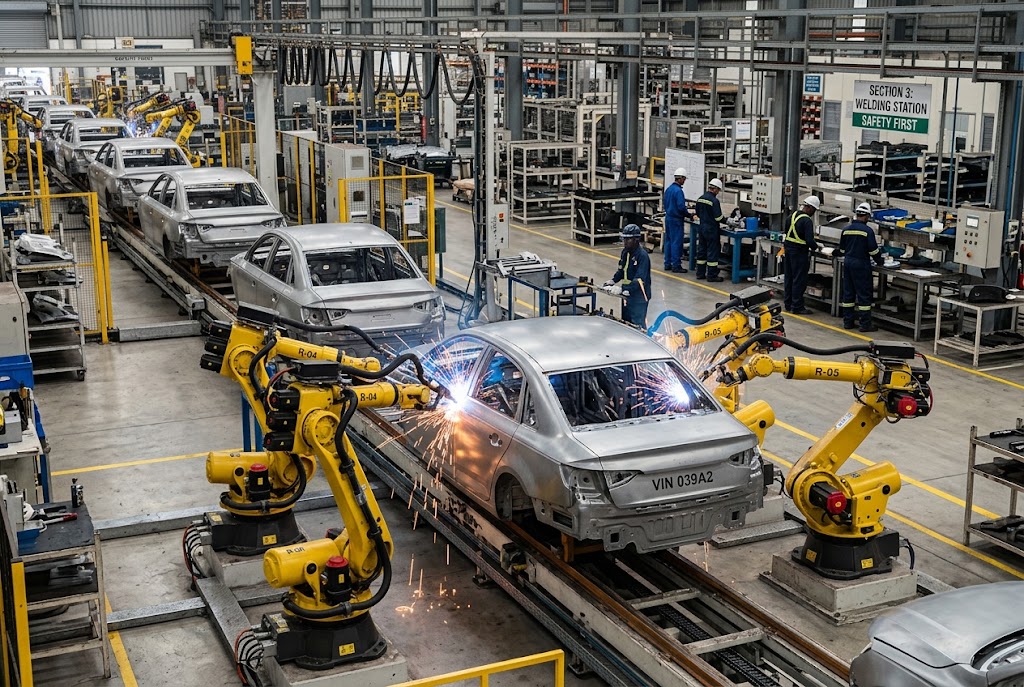
Flow production: identical cars, non-stop.
openrevise.com
EDEXCEL GCSE BUSINESS · PAPER 2

Comparing Production Processes
Making operational decisions
Lesson 1 of 4
Feature
Job
Batch
Flow
Number made
One at a time
Groups of identical items
Huge numbers, continuously
Product
Unique, made to order
Same within a batch
Identical
Cost per unit
High
Medium
Low
Workers
Highly skilled
Semi-skilled
Mostly machines, less skilled
Flexibility
Very high
Some
Very low
Example
Wedding dress
Bread
Cars
openrevise.com
EDEXCEL GCSE BUSINESS · PAPER 2

Batch by Batch
Making operational decisions
Lesson 1 of 4
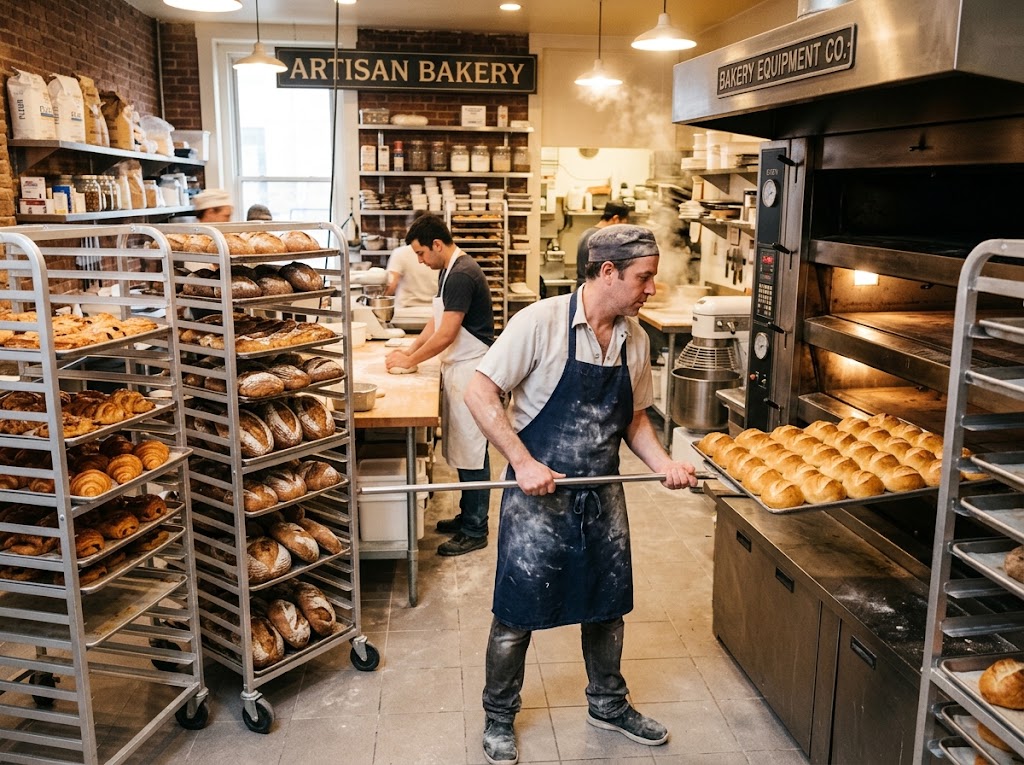
Batch production: one batch of rolls, then a batch of croissants.
A bakery is the classic example of batch production. It makes a batch of rolls, then switches to croissants, then to loaves. Each batch is identical, but the business can still offer variety - at the cost of time lost changing over between batches.
openrevise.com
EDEXCEL GCSE BUSINESS · PAPER 2

Flexibility or Low Cost?
Making operational decisions
Lesson 1 of 4
JOB AND BATCH PRODUCTION
• Flexible: products can be changed or customised.
• Suits small orders and variety.
• Customers get what they want.
• But: higher cost per unit.
• Skilled staff are expensive.
FLOW PRODUCTION
• Very low cost per unit through economies of scale.
• Consistent quality from machines.
• Huge output.
• But: expensive to set up.
• Inflexible: hard to change the product, and boring, repetitive work.
openrevise.com
EDEXCEL GCSE BUSINESS · PAPER 2

PART TWO
Technology and Production
How machines and computers change operations.
openrevise.com
EDEXCEL GCSE BUSINESS · PAPER 2

Productivity
Making operational decisions
Lesson 1 of 4
Productivity is the output produced per worker, or per machine, in a period of time.
Example
A bakery worker who makes 400 loaves a day is more productive than one who makes 300.
Why it matters
Higher productivity means more output for the same cost, so the cost of each unit falls.
How to raise it
Better technology, training, and motivated staff.
openrevise.com
EDEXCEL GCSE BUSINESS · PAPER 2

The Impact of Technology on Production
Making operational decisions
Lesson 1 of 4
Costs
Machines are expensive to buy, but reduce labour costs and waste, so cost per unit falls over time.
Productivity
Robots and automated machines work faster and non-stop, producing far more output.
Quality
Computer-controlled machines make every product to exactly the same standard, with fewer mistakes.
Flexibility
Modern computer-aided machines can be reprogrammed quickly, so even flow production can offer some variety.
openrevise.com
EDEXCEL GCSE BUSINESS · PAPER 2
Making operational decisions
Lesson 1 of 4
CASE STUDY

Morgan: Still Built by Hand
The Morgan Motor Company has made cars in Malvern, Worcestershire, since 1910. While most car makers use flow production with thousands of robots, Morgan still builds its cars largely by hand, using skilled craftspeople and, on many models, a frame made partly of ash wood. Customers can choose colours, leather and details for their own car. Output is tiny compared with a mass-market factory and each car costs far more - but customers pay for a hand-built, personalised car that flow production could never offer.
1910
Morgan founded in Malvern
By hand
How most of each car is built
openrevise.com
EDEXCEL GCSE BUSINESS · PAPER 2

Key Terms
Making operational decisions
Lesson 1 of 4
Operations
The activities that turn inputs into goods and services.
Job production
Making one unique product at a time, usually to order.
Batch production
Making a group of identical products together before switching to another batch.
Flow production
Making identical products continuously on a production line.
Productivity
Output per worker or per machine in a period of time.
Automation
Using machines and computers to carry out tasks with little human input.
openrevise.com
EDEXCEL GCSE BUSINESS · PAPER 2
Making operational decisions
Lesson 1 of 4

YOUR TASK
Which Process?
10 minutes
Choose the best production process for each and explain why: a custom-built garden shed; 50,000 identical cans of cola a day; 200 birthday cards in each of 20 designs; a portrait painting; frozen pizzas in six flavours.
1
Choose job, batch or flow.
2
Explain your choice.
WHAT A GOOD ANSWER SHOWS
Job for the shed and the portrait, flow for the cola, batch for the cards and the pizzas, each with a reason about quantity, variety and cost.
openrevise.com
EDEXCEL GCSE BUSINESS · PAPER 2

Can I...?
Making operational decisions
Lesson 1 of 4
Explain what operations are.
Explain job production.
Explain batch production.
Explain flow production.
Compare the three processes.
Explain productivity.
Explain how technology affects costs and productivity.
Explain how technology affects quality and flexibility.
openrevise.com
EDEXCEL GCSE BUSINESS · PAPER 2
Summary & Exam Focus
Job production: unique products, high cost, very flexible.
Batch production: groups of identical products, some flexibility.
Flow production: identical products continuously, low unit cost, inflexible.
Technology affects costs, productivity, quality and flexibility.
EXAM FOCUS
Explain one impact on a business of introducing automated machinery into its production. (3 marks)
Technology questions have two sides: high set-up costs now, lower unit costs and better quality later. Use the business's context to decide which matters more.
openrevise.com
← → to move, F to present full screen, G for every slide at once.